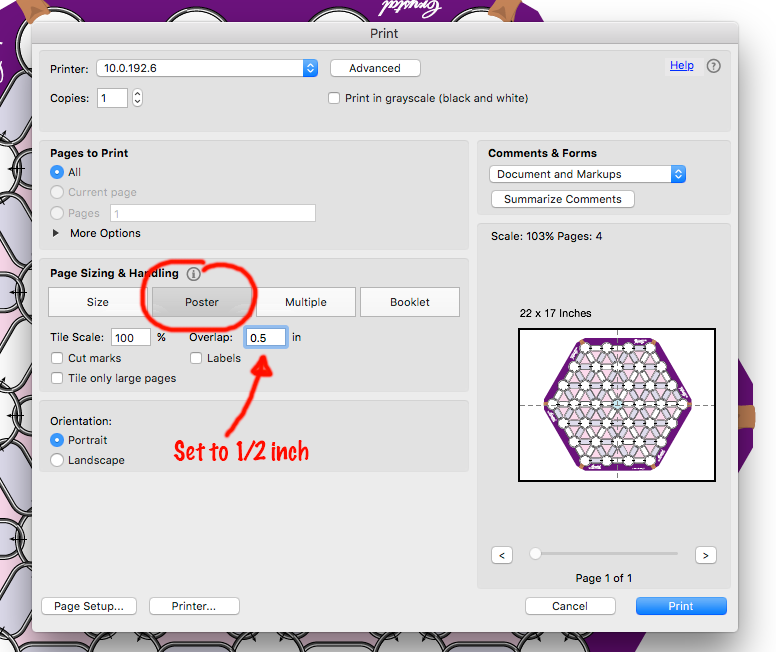
Crystal Word Chain The PDF of the full-size board is big enough that you'll have to tile the print and then tape and/or glue it all together. It's a bit of a pain to do for just one game. That's why I'd recommend getting it laminated, so you can use it over and over. To tile in Acrobat, go to the print dialog box (File > Print) and select the Poster button in the middle of the dialog box. Set the overlap to 0.5 inches. That should make sure you don't lose any of the image in the white border that printers leave around the edge. You'll need to trim the pages with an Xacto blade or a pair of scissors, then tape and glue them together. My process is this: I line up two of the pages with them face-up, then put a piece of masking tape lightly on top to hold it temporarily. Then I turn the pages over and tape the back with one long piece of scotch tape. I turn the page back over, and remove the masking tape. Lastly, I fold the pages back along the taped seam, laying the top overlapping paper flat on a scrap piece of paper. I run a glue stick along the edge of the paper, then fold the two pieces flat again, rubbing down the glued seam. I know that might be hard to follow. To clarify, I made a short video to demonstrate: This game is an Open Artifacts project. Learn more about how to contribute.Downloads
Printing the Board